Updated March 24: restructured, added table of contents and development process.
PyBevy is a Python real-time engine built on Bevy's renderer and ECS. Write Python, save the file, see your scene update. NumPy, JAX, PyTorch run in the same process as the renderer — no IPC, no serialization.
pip install pybevyBeta — pypi/pybevy · github/pybevy. Source published under MIT and Apache 2.0. Test suite published later. API is evolving — help shape it. Independently developed and community-maintained. Not affiliated with the Bevy project. Python 3.12+.
6,000 cubes demolished by a meteor, GPU physics via NVIDIA Newton/Warp + Numba writeback — meteor_strike.py
Contents: The Engine · Your First App · Python Ecosystem · The ECS · Performance · Safety · Native Plugin Mode · AI Feedback Loop · Rendering Details · Development Process · What's Coming · Limitations
The Engine
PyBevy is built on Bevy's renderer and ECS. Write Python, save the file, and see your scene update. The rendering runs entirely in Rust — PBR materials, cascaded shadows, bloom, volumetric fog, SSAO, transmission. Python sets up scenes and mutates components; Bevy handles the GPU.
# PBR materials
commands.spawn(
    Mesh3d(meshes.add(Sphere(1.0))),
    MeshMaterial3d(materials.add(StandardMaterial(
        base_color=Color.srgb(0.8, 0.2, 0.2),
        metallic=1.0,
        perceptual_roughness=0.3,
    ))),
)

# Lights with shadows
commands.spawn(
    DirectionalLight(illuminance=8000.0, shadows_enabled=True),
    Transform.from_rotation(Quat.from_euler(EulerRot.XYZ, -0.7, 0.5, 0.0)),
)

# Post-processing
commands.spawn(
    Camera3d(),
    Bloom(intensity=0.15),
    DistanceFog(falloff=FogFalloff.Exponential(0.003)),
)
Glass, transmission, custom shaders, procedural meshes, 2D sprites, spatial audio — it's all there. Details below in Rendering Details.
Volumetric fog, god rays, HDR bloom, 20K+ dust particles via View API + Numba JIT — crystalline_cavern.py
Your First App
That's the renderer. What does the code look like? If you know Bevy's Rust API, this should feel familiar — systems are functions, type annotations drive everything, full type stubs ship for IDE autocomplete.
from pybevy.prelude import *

@component
class Rotator(Component):
    pass

def setup(
    commands: Commands,
    meshes: Assets[Mesh],
    materials: Assets[StandardMaterial],
) -> None:
    cube = meshes.add(Cuboid(2, 2, 2))
    mat = materials.add(Color.srgb(0.8, 0.7, 0.6))

    parent = commands.spawn(
        Mesh3d(cube), MeshMaterial3d(mat),
        Transform.from_xyz(0, 0, 1), Rotator(),
    )
    parent.with_children(lambda c: [
        c.spawn(Mesh3d(cube), MeshMaterial3d(mat), Transform.from_xyz(0, 0, 3))
    ])

    commands.spawn(PointLight(intensity=2_000_000.0), Transform.from_xyz(4, 8, 4))
    commands.spawn(Camera3d(), Transform.from_xyz(5, 10, 10).looking_at(Vec3.ZERO, Vec3.Y))

def rotate(time: Res[Time], query: Query[Mut[Transform], With[Rotator]]) -> None:
    for transform in query:
        transform.rotate_x(3.0 * time.delta_secs())

@entrypoint
def main(app: App) -> App:
    return (
        app.add_plugins(DefaultPlugins)
        .add_systems(Startup, setup)
        .add_systems(Update, rotate)
    )

if __name__ == "__main__":
    main().run()
Save it, run pybevy watch my_scene.py, and you get two rotating cubes. Edit the code — the engine hot reloads near instantly. No restart, no recompile. See the Quick Start for a step-by-step guide.
Python Ecosystem, In-Process
The real payoff of a Python engine isn't the syntax — it's everything you can import. NumPy, JAX, PyTorch — they run inside your ECS systems with no IPC, no serialization, no subprocess. The CNN on MNIST example trains a model inside a Bevy system and visualizes the network in real time:
def train_cnn_system(
    time: Res[Time], bundle: ResMut[ModelBundle], viz_state: ResMut[CnnVizState]
) -> None:
    inputs, labels = next(bundle.data_loader_iter)
    bundle.optimizer.zero_grad()
    outputs = bundle.model(inputs)
    loss = bundle.criterion(outputs, labels)
    loss.backward()
    bundle.optimizer.step()

    viz_state.input_image = inputs[0].data.cpu().numpy().squeeze()
    viz_state.output_activations = torch.softmax(outputs[0], dim=0).data.cpu().numpy()
PyTorch trains. Bevy renders. Same process.
PyTorch CNN training with real-time 3D visualization of activations and predictions — neural_network_training.py
Anything in your requirements.txt works inside systems — LLM APIs, ML inference, audio processing, databases.
The Entity Component System
Under the hood, all of this — the rendering, the hot reload, the Python ecosystem — runs on Bevy's Entity Component System. Your systems are scheduled by Bevy's parallel scheduler, components live in columnar storage, queries run against archetype tables.
@component
@dataclass
class Velocity(Component):
    vx: float = 0.0
    vy: float = 0.0

def movement(query: Query[tuple[Mut[Transform], Velocity]], time: Res[Time]) -> None:
    dt = time.delta_secs()
    for transform, vel in query:
        transform.translation.x += vel.vx * dt
        transform.translation.y += vel.vy * dt
Custom components with batch-eligible fields (float, int, bool, Vec3, Vec2, Color) are serialized to fixed-size byte buffers and stored as native Bevy Copy types in archetype tables — no PyObject lives in the ECS. Compound types like Vec3 decompose into their scalar components at the storage level, so the batch tiers access individual axes directly. This is what enables the high-performance batch tiers.
Components with non-primitive fields (strings, lists, arbitrary Python objects) can opt into PyObject storage, explicitly marked by the user. Both paths work transparently through the same Query API. That transform.translation.x += ... writes directly to Bevy's ECS memory through a borrowed pointer into the column, validated by an atomic flag. No copy-back needed.
Filters (With[T], Without[T], Changed[T], Added[T]), resources (Res[T], ResMut[T]), commands, events, custom components as dataclasses — it all works.
Performance
Per-entity Python is slower than Rust — but for the entity counts most rendered scenes need, the overhead is sub-millisecond. When you need more, multiple execution tiers bridge the gap:
| Tier | How it works | 1M entities | Best for |
|---|---|---|---|
| Query (built-in) | Python iteration, 1 core | 168 ms (~328x) | Game logic, input, AI decisions |
| Query (@component) | Python iteration, 1 core | 286 ms (~557x) | Custom component logic |
| View API | Bytecode VM, all cores | 2.1 ms (~4.0x) | Bulk transforms, simple physics |
| Numba JIT | LLVM-compiled, all cores | 2.1 ms (~4.4x) | Heavy simulations, N-body, flocking |
| JAX GPU | @jax.jit via XLA |
— | O(n^2) physics, ML inference |
| Native Rust | Bevy direct, all cores | 0.51 ms (1.0x) | — |
Benchmarked on AMD Ryzen 9 9950X3D (16 cores), 64 GB DDR5, Linux. Benchmark source.
At 2.1 ms per million entities, the batch tiers can process 5–6M+ entity mutations per frame at 60fps. For rendered scenes, PyBevy matches native Bevy FPS — both hit 60fps at ~120K animated entities.
150K walking people, procedural streets and buildings, ~100x speedup with View + Numba — city_simulation.py
The View API (Bytecode VM)
The View API bypasses Python iteration entirely. Think NumPy-style vectorized operations, but over ECS columns instead of arrays:
def update_positions(view: View[tuple[Mut[Transform], Velocity]]) -> None:
    pos = view.column_mut(Transform)
    vel = view.column(Velocity)
    pos.translation.x += vel.vx * 0.016
    pos.translation.y += vel.vy * 0.016
No Python loop runs. vel.vx returns a FieldExpr — every operator (+, *, +=) builds an AST node rather than computing anything. The assignment triggers compilation to stack-based bytecode, which then executes directly over Bevy's columnar storage.
Bevy's archetype tables are structurally columnar — the same layout that makes analytical databases fast. The VM reads fields at base_ptr + index * stride + offset, processes 32,768-entity chunks sized for L1/L2 cache residency, and distributes chunks across Rayon's thread pool.
Cross-component expressions work naturally — a single bytecode program can reference fields from multiple components:
light = view.column_mut(PointLight)
pos = view.column(Transform)
energy = view.column(Energy)

light.intensity = 500.0 + expr.sin(pos.translation.x) * energy.value
Supported operations: arithmetic, trigonometric functions (sin, cos, sqrt, abs, ...), comparisons, branchless conditionals (.where()), clamp, lerp, random. Speed: within ~4x of native Rust at 1M entities. At 100K entities: 0.27ms vs. Query's 16.8ms — a 62x speedup. The tradeoff: the View API doesn't support arbitrary logic like branching or loops — for that, step up to Numba.
64,000 glowing spheres orbiting in a vortex via spawn_batch + View API — batch_demo.py
Numba JIT (LLVM-Compiled)
For compute-heavy inner loops, raw ECS column pointers are passed to Numba for LLVM compilation. Write standard Python with @numba.jit and it compiles to native machine code.
@numba.jit(nopython=True, parallel=True)
def gravity_kernel(py, vy, n, dt):
    for i in numba.prange(n):
        vy[i] -= 9.81 * dt
        py[i] += vy[i] * dt

def apply_gravity(view: View[tuple[Mut[Transform], Mut[Velocity]]]) -> None:
    for batch in view.iter_batches():
        pos = batch.column_mut(Transform).translation
        vel = batch.column_mut(Velocity)
        gravity_kernel(pos.y, vel.vy, len(batch), 0.016)
Column pointers are exposed as custom Numba types (ViewCol) that give LLVM direct memory access to ECS columns while preserving the ValidityFlag safety model. Five dtype-specialized singletons (f32/f64/i32/i64/bool) enable compile-time type resolution with zero runtime branches in the LLVM IR. Writes use LLVM volatile stores to prevent the optimizer from eliding writes to ECS memory that Bevy reads from a different compilation unit.
The flocking benchmark shows the full stack: at 5,000 boids with O(n^2) pairwise interactions, per-entity Python takes 1,625ms. Numba single-threaded: 11.7ms (139x from LLVM compilation alone). Numba parallel on 16 cores: 1.64ms — a 991x total speedup.
Morphing parametric surfaces, fractal attractors, and wave functions on a 200x200 grid via Numba JIT — mathematical_singularity_garden.py
Speed: within ~4.4x of native Rust at 1M entities on a trig-heavy physics kernel. Handles arbitrary control flow, branches, loops — anything Numba supports. For O(n^2) workloads that benefit from GPU parallelism, JAX can take it further.
JAX GPU Compute
For massively parallel workloads — N-body gravity, fluid simulation, flocking — PyBevy can offload physics to the GPU via JAX. View API columns register as JAX pytrees — ECS data is copied from CPU to GPU arrays on input, the kernel runs on the GPU, and results are copied back to ECS with from_jax(). The CPU–GPU roundtrip overhead is negligible relative to O(n^2) GPU kernels.
Write the kernel in NumPy-style Python — JAX compiles it to optimized CUDA kernels via XLA:
@jax.jit
def nbody_step(pos, vx, vy, vz, mass, dt):
    dx = pos.x[:, None] - pos.x[None, :]
    dy = pos.y[:, None] - pos.y[None, :]
    dz = pos.z[:, None] - pos.z[None, :]
    r2 = dx**2 + dy**2 + dz**2 + SOFTENING**2
    inv_r3 = r2 ** (-1.5)
    ax = jnp.sum(dx * inv_r3 * mass[None, :], axis=1) * G
    ...
    return new_pos, new_vx, new_vy, new_vz
Call it from a standard ECS system — individual column fields pass directly to @jax.jit, and from_jax() writes results back:
def gravity_system(
    view: View[tuple[Mut[Transform], Mut[Velocity], Mass], With[Body]],
    time: Res[Time],
) -> None:
    for batch in view.iter_batches():
        pos = batch.column_mut(Transform)
        vel = batch.column_mut(Velocity)
        mass_col = batch.column(Mass)

        new_pos, new_vx, new_vy, new_vz = nbody_step(
            pos.translation, vel.vx, vel.vy, vel.vz,
            mass_col.value, time.delta_secs(),
        )

        pos.translation.from_jax(new_pos)
        vel.vx.from_jax(new_vx)
        ...
Batch Spawning
For large entity counts, spawn_batch creates entities from NumPy arrays without per-entity Python overhead:
positions = np.stack([x, y, z], axis=1)  # (N, 3) float32
batch = Transform.from_numpy(positions=positions)
entities = world.commands().spawn_batch(batch, Marker())
The 20M entity example spawns 20 million entities this way and animates them with the View API.
Safety
Bevy's Rust lifetimes guarantee memory safety at compile time. Python has no lifetimes. PyBevy reconstructs equivalent guarantees at runtime:
System scoping. ECS data is only accessible inside the system that received it. When a system returns, every reference is invalidated.
ValidityFlags. Every borrowed reference carries an Arc<AtomicU8> checked on every access. Stale reference → RuntimeError, not segfault.
Parameter validation. At registration time, PyBevy enforces Rust's borrowing rules — prevents multiple mutable queries for the same component, detects read-write conflicts.
Borrowed field access. Property getters on components like Transform return borrowed references directly into ECS memory — not copies. The ValidityFlag propagates to nested accessors — transform.translation.x inherits the same flag through every level, so stale access is caught regardless of nesting depth.
Full details in the safety documentation.
Native Plugin Mode
Embed PyBevy into a Rust Bevy application. Iterate fast in Python with hot reload, convert performance-critical parts to Rust when ready.
App::new()
    .add_plugins(DefaultPlugins)
    .add_plugins(PyBevyPlugin::new("scripts/game.py"))
    .run();
Bevy does the rendering. Python handles the logic, the data, and the ecosystem. You don't have to choose. See the Rust Interop tutorial for the full walkthrough.
AI Feedback Loop
PyBevy includes a built-in MCP server that lets AI agents write Python, reload the scene, capture screenshots, inspect entities, and iterate. The AI sees what it builds. This is optional — PyBevy works the same with or without it.
# Claude Code
claude mcp add pybevy -- pybevy mcp
# Gemini CLI
gemini mcp add pybevy pybevy mcp
# Codex CLI
codex mcp add pybevy -- pybevy mcp
The feedback loop ships with a full API spec derived from the same Python type stubs that power IDE autocomplete — so the AI can look up any component's constructor and fields, plus curated guides on lighting, materials, shadows, camera work, and scene recipes.
Run pybevy mcp-eject to get editable definitions in .pybevy/mcp/ — override tool descriptions, add custom guides, and tune behavior for your project.
Rendering Details
Glass, water, and transmission:
glass = StandardMaterial(
    base_color=Color.linear_rgba(0.9, 0.95, 1.0, 0.3),
    specular_transmission=0.9,
    ior=1.5,
    perceptual_roughness=0.08,
    metallic=0.0,
    alpha_mode=AlphaMode.Blend(),
)
Custom shaders — write your fragment shader in WGSL and define the material as a Python class. Fields become shader uniforms — PyBevy generates the GPU binding layout from the type annotations:
@material(fragment_shader="shaders/hologram.wgsl")
class HologramMaterial:
    color: LinearRgba = LinearRgba(0.0, 1.0, 0.8, 1.0)
    energy: float = 1.0
    scan_speed: float = 1.0
Procedural meshes and textures — the with context manager provides zero-copy NumPy access to internal Bevy mesh data (vertices, indices, normals) scoped to the block for safety:
colorful_cube = Cuboid().mesh().build()

with colorful_cube.attribute(Mesh.ATTRIBUTE_POSITION) as positions:
    colors = np.zeros((len(positions), 4), dtype=np.float32)
    colors[:, 0] = (1.0 - positions[:, 0]) / 2.0
    colors[:, 1] = (1.0 - positions[:, 1]) / 2.0
    colors[:, 2] = (1.0 - positions[:, 2]) / 2.0
    colors[:, 3] = 1.0

colorful_cube.insert_attribute(Mesh.ATTRIBUTE_COLOR, colors)
2D — Full sprite system with texture atlases and animation. Audio — Spatial 3D audio with positional sources and listener.
Development Process
PyBevy started in May 2025 as a pure-Python ECS prototype with commands, queries, and entities, then moved through a ctypes FFI layer before pivoting to PyO3, which became the real foundation. Hand-written .pyi type stubs drove the API design before the Rust integration was fully in place. The project also builds on Bevy experience going back to 2021.
The ECS query model, safety/validity system, and core Bevy component bindings were developed manually across multiple iterations.
From November 2025 onward, AI tools were used more heavily for API coverage expansion across Bevy's large surface area, crate splitting into ~30 feature crates, and parts of the test/stub/documentation workflow.
To keep that process grounded, PyBevy is backed by pybevy_lint, a custom API compliance tool that validates bindings against Bevy's source and the Python stubs, and a test suite spanning 100K+ lines. Both publishing soon.
Architecture and Coverage
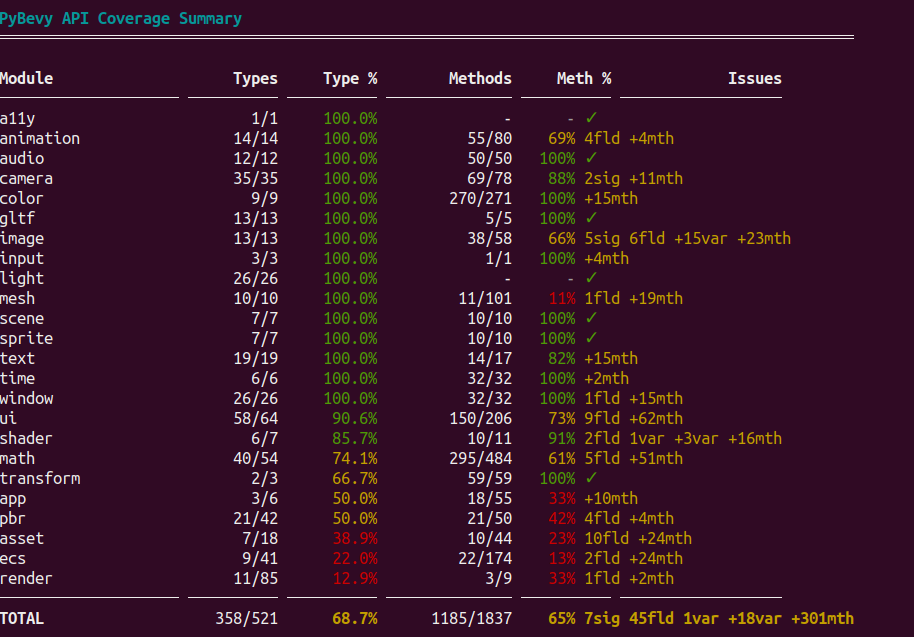
PyBevy is split into ~30 feature crates mirroring Bevy's modular design. Each registers component bridges into a dynamic registry at startup. Core modules (transforms, lighting, cameras, input) are fully covered; others are in progress.
Bevy version upgrades have been smooth — during development PyBevy has been updated from Bevy 0.16 → 0.17 → 0.18, each taking less than a day.
The test suite is extensive — thousands of tests covering ECS safety, component mutations, hot reload, rendering, audio, and all batch execution tiers.
What's Coming
Three directions are in active development:
GPU-GPU zero-copy and Python render graph nodes. A @view_node decorator lets Python functions execute inside Bevy's render graph with direct GPU memory access — no CPU round-trip. JAX kernels running GPU raymarching, cinematic post-processing, and style transfer directly in the render pipeline. This is the bridge that makes real-time ML inference in the render loop practical.
Browser runtime (RustPython). The WASM demo on this page runs a subset of PyBevy via RustPython. The branch is at 95.1% test compatibility (3,062 of 3,218 tests passing) and improving — text rendering, accessibility, sprite bridges, and component repr are the current focus. The goal: pip install quality in the browser with shareable URLs.
In-scene agents. Agents as ECS entities that observe, decide, and act inside the running world — not just creating scenes from outside, but inhabiting them. The agent system includes fire-and-forget tools, argument coercion, observability events, and stale-work detection. Early and experimental.
Track progress: render graph nodes (#14), GPU-GPU buffers (#15), in-scene agents (#16), browser runtime (#12), particles (#13).
Limitations
- No built-in physics yet — use NumPy, JAX, or Rapier-py for physics, PyBevy for visualization. Physics integration planned.
- Desktop only — Windows, macOS, Linux. A WASM build is technically feasible (the demo on this page runs on it) but not published yet — API coverage is increasing and quirks are being fixed.
- Code only — no visual editor.
- GIL — on standard CPython, Python systems serialize under the GIL. Free-threaded Python (3.14t+) achieves real parallel execution. The View API and Numba JIT release the GIL during batch computation regardless.
- No runtime Rust plugin loading — third-party Bevy plugins must be compiled into the package. No mechanism for loading external Rust crates at runtime.
See Limitations for the full list.
Next Steps
pip install pybevySee the Quick Start for a step-by-step guide, or browse 90+ examples — 2D sprites, 3D scenes, ECS patterns, View API and Numba, and complex simulations.
Star the repo and join the Discord. Contributions welcome — code, documentation, examples, bug reports, or just telling us what you're building.
Acknowledgments
PyBevy would not exist without the Bevy team and community. Bevy's modular architecture, clean ECS design, and open-source ethos made this project possible. I've been a believer in the Bevy ecosystem since building an OpenXR MVP on it in 2021, and the engine has only gotten better since. The longevity of Bevy matters — if you find it valuable, consider sponsoring the project or contributing. A healthy Bevy means a healthy PyBevy. Both Bevy and PyBevy are dual-licensed under MIT and Apache 2.0.
Thanks also to the PyO3 team for making Rust-Python interop practical, and to the Numba and NumPy communities whose work powers the batch execution tiers.
When you want it, the world runs itself.